 |
|
 |
|
Step 6 |
||
|
|
|
 |
||
|
|
|
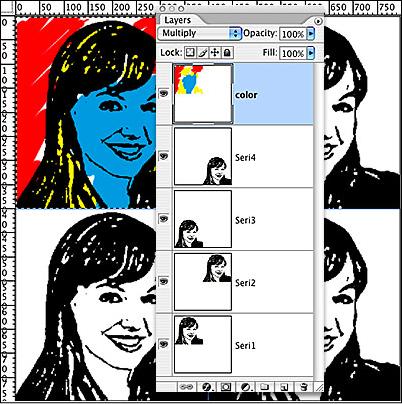
With the Color layer selected, hold down the Command key (Control key for PC), and tap on the Seri1 layer– this will marquee the pixels of the Seri1 layer for the Color layer. Choose the Paintbrush tool, and select the Hard Round 19 pixel brush. (If you’re using a wacom tablet, set the Size to react to pressure.) Choose a bright color, and paint in the background. With the marquee, you can’t paint outside the lines– pretty cool! Choose other bright colors for the hair and face and paint away. |
||
|
|
|
 |
 |
|||
|
|
|
|
|
| Close Window | ||
|
|
|